Download and Manage Your Udemy Courses Offline with Udeler
A reliable desktop solution for organizing and accessing your enrolled Udemy courses anytime, anywhere. Learn at your own pace with a streamlined offline experience.
- No Subscription Required
- No Ads or Trackers
- Active Development
What is Udeler?
Udeler is a powerful desktop application that enables users to download and manage their online course content for convenient offline access. Designed with simplicity and efficiency in mind, Udeler helps learners organize educational materials, access lessons without an internet connection, and maintain a more flexible study schedule.
The software features an intuitive interface that makes it easy to browse courses, manage downloads, and keep learning resources well organized. Compatible with Windows, macOS, and Linux, Udeler serves a wide range of users, including students, professionals, developers, and self-learners who want uninterrupted access to their educational content. By allowing offline learning, Udeler helps users save bandwidth, study while traveling, and continue their education regardless of internet availability.
Its combination of ease of use, reliable performance, and practical functionality has made Udeler a popular tool among individuals seeking a more convenient and efficient online learning experience. Furthermore, Udeler supports better learning productivity by giving users greater control over their course materials, making it easier to review lessons, revisit important topics, and create a personalized learning environment tailored to their individual educational goals.
Our Mission
To empower individuals and organizations through innovative, accessible, and high-quality learning solutions that foster knowledge, skills, and lifelong growth in an ever-evolving world.
Vision
To become a leading global platform for education and professional development, inspiring people to unlock their full potential and create a positive impact in their communities and industries.
- Features
Everything You Need
Packed with powerful features designed to give you complete control over your offline learning library.
Full Course Download
Download complete Udemy courses including every video lecture, supplementary resource file, and embedded subtitle track. Your offline library mirrors the entire online learning experience perfectly without any missing elements or broken media references.
Quality Selection
Choose your preferred video resolution from 360p up to full 1080p HD quality. Udeler lets you balance file size against visual clarity so you can optimize storage space while maintaining excellent offline viewing quality.
Batch Downloading
Queue multiple courses for simultaneous downloading without any artificial speed restrictions. Udeler's intelligent parallel processing engine maximizes your available bandwidth efficiency, dramatically reducing total wait times when building large offline course libraries.
Built-in Browser
Access Udemy directly through the integrated browsing interface without switching between tabs or external applications. Simply log into your account, browse your enrolled courses, and initiate downloads using a seamless unified workflow.
Subtitle Support
Automatically download and embed subtitle tracks in multiple languages alongside your video content. Udeler preserves all accessibility features so your offline learning experience remains completely inclusive and fully functional across every supported language.
Auto Updates
Stay current with automatic update notifications that keep Udeler compatible with Udemy's evolving platform. The development team actively maintains the application, ensuring reliable performance and rapid fixes for any emerging issues.
Why Offline Learning Matters
Why Offline Learning Matters
Udeler, we recognize that not every learner has constant access to the internet, which is why offline learning is a core part of our educational approach. By allowing learners to access content anytime and anywhere, offline learning ensures continuous education without connectivity barriers. It empowers students, professionals, and lifelong learners to study at their own pace while reducing dependence on internet availability and data costs. Through offline learning, Udeler aims to create a more inclusive, flexible, and accessible learning environment that supports success for everyone.
- Enables learning without an internet connection.
- Provides access to education in remote and underserved areas.
- Reduces dependence on expensive mobile data plans.
- Allows learners to study anytime and anywhere.
- Ensures uninterrupted learning during network outages.
- Helps learners stay focused by minimizing online distractions.
- Supports flexible and self-paced learning schedules.
- Increases accessibility for students with limited digital resources.
- Improves learning continuity while traveling or commuting.
- Promotes equal educational opportunities for all learners.

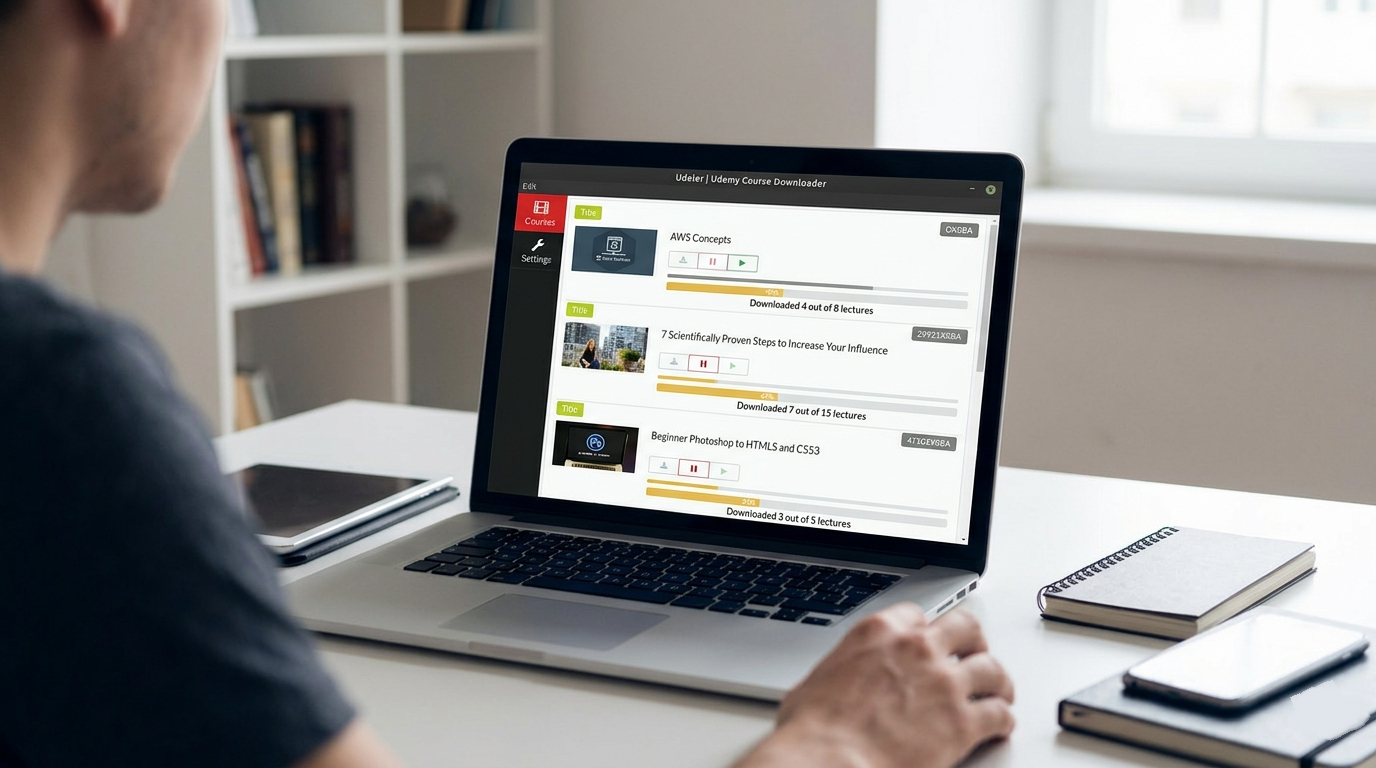
Inside the Udeler Dashboard
Clean
Udeler features a clean and intuitive interface that makes managing course downloads simple for users of all experience levels.
Simple
Its organized layout allows learners to quickly browse courses, monitor download progress, and access educational content without confusion.
User-Friendly
The streamlined design reduces complexity and helps users focus on learning rather than navigating complicated settings
Get Started in Minutes
Choose your platform and follow the straightforward installation steps below.
Download the Installer
Visit the releases page and download the latest Udeler-Setup-x.x.x.exe file to your computer.
Run the Installer
Double-click the downloaded file. Windows may show a SmartScreen warning — click "More info" then "Run anyway" to proceed.
Complete Setup
Follow the installation wizard prompts. Choose your install directory and click "Install" to copy files to your system.
Launch Udeler
Find Udeler in your Start Menu or desktop shortcut. The application opens instantly and is ready for your Udemy login.
Download the DMG
Download Udeler-x.x.x.dmg from the releases page. Ensure you get the correct version for your Apple Silicon or Intel Mac.
Open the Disk Image
Double-click the DMG file to mount it. Drag the Udeler application icon into your Applications folder to install.
Allow on First Launch
Right-click the app and select "Open" to bypass Gatekeeper. Confirm you want to open the application in the security dialog.
Start Using Udeler
Launch from Applications or Spotlight. The app is ready for authentication and course downloading immediately.
Download the AppImage
Download Udeler-x.x.x.AppImage from the releases page. This portable format works on most Linux distributions without installation.
Make Executable
Open terminal and run the following command to grant execution permissions to the downloaded file.
chmod +x Udeler-x.x.x.AppImage
Install Dependencies
Ensure you have the required libraries installed on your system.
sudo apt install libappindicator3-1 ffmpeg
Run the Application
Double-click the AppImage file or execute it from terminal. Udeler launches and is ready for your Udemy credentials.
Advantages of Udeler
Key differentiators that make Udeler the preferred choice for millions of learners worldwide.
Zero Cost
Udeler is completely free and open source software. There are no hidden fees, premium tiers, or subscription requirements. Every feature is available to all users without any financial commitment or usage limitations whatsoever.
Privacy First
Your Udemy credentials never leave your device. Udeler operates entirely locally without transmitting login data to external servers. Your personal information, course selections, and download history remain completely private and secure at all times.
Lightweight
The application consumes minimal system resources during all operations. Udeler runs smoothly on older hardware with modest specifications, ensuring consistently responsive performance even when actively downloading multiple large courses simultaneously in the background.
Open Source
Full source code available on GitHub for transparency and community contributions. Anyone can audit the codebase, submit improvements, or build custom features. This ensures the project remains trustworthy, secure, and continuously evolving through collaborative development.
Subtitle Intuitive Interface
Clean, modern user interface designed for simplicity and efficiency. No steep learning curves or confusing settings panels. Every action from login to download completion follows a logical flow that even non-technical users can navigate comfortably on their first attempt.
Community Support
Join thousands of active users on GitHub Discussions and community forums. Get help with installation issues, feature requests, or troubleshooting from experienced contributors. Regular community interactions drive rapid improvements and helpful knowledge sharing.
Performance & Efficiency
Fast Downloads
Fast downloads in Udeler ensure that users can quickly save their course content without long waiting times, making the learning process more efficient and convenient. The optimized download system helps reduce delays while maintaining stable performance, even when downloading large video lectures or complete courses. This feature is designed to enhance productivity by allowing learners to access their study materials faster and begin offline learning without unnecessary interruptions.
Better Organization
Better organization in Udeler helps users manage their downloaded courses in a structured and efficient way. It allows learners to keep all educational content neatly arranged, making it easier to find specific lessons or revisit important topics whenever needed. This organized system improves the overall learning experience by reducing confusion and helping users stay focused on their study goals.
How It Works
Four simple steps to build your offline course library. No technical expertise required.
Launch Udeler
Open the application on your Windows, macOS, or Linux system. The clean interface loads instantly and presents a prominent login button to begin your session.
Authenticate
Click login and a secure browser window opens for Udemy authentication. Enter your credentials directly on Udemy's official site. Udeler never sees or stores your password.
Select Courses
Browse your enrolled courses within the built-in interface. Choose video quality preferences and select which courses or specific lectures you want to download to your local storage.
Download
Hit the download button and Udeler handles everything automatically. Progress bars track each lecture, and courses are organized into neatly structured folders on your device.
Udeler vs Alternative Tools
| Feature | Udeler | Alternative Tools |
|---|---|---|
| Ease of Use | Simple and user-friendly interface | May have a steeper learning curve |
| Installation | Quick and lightweight setup | Often requires additional configuration |
| Offline Access | Supports convenient offline learning | Varies depending on the tool |
| Course Management | Organized course browsing and management | May offer limited organization features |
| Download Speed | Optimized for efficient downloads | Speed may vary between applications |
| Platform Support | Available on Windows, macOS, and Linux | Some tools support fewer platforms |
| Learning Flexibility | Access content anytime and anywhere | Features differ across tools |
| Resource Usage | Lightweight and efficient | Some alternatives consume more system resources |
| User Experience | Clean and intuitive workflow | Can be complex or feature-heavy |
| Accessibility | Easy access to downloaded content | Accessibility options vary by tool |
Community & Future Updates
Latest Feature Enhancements
Udeler continues to improve through regular feature enhancements that help create a better learning experience for users. These updates focus on improving performance, usability, and overall reliability while keeping the application simple and efficient.
Key Points:
- Improved Download Performance – Faster and more stable course downloads.
- Enhanced User Experience – Better interface navigation and usability.
- Bug Fixes and Stability Updates – Ongoing improvements for smoother operation.
User Feedback and Community Support
The Udeler community plays an important role in shaping the application’s development. User feedback helps identify new features, improve existing functionality, and address common issues.
Key Points:
- Community-Driven Improvements – User suggestions influence future updates.
- Active Support Network – Access help and guidance from other users.
- Continuous Feedback Collection – Regular input helps refine the software.
Upcoming Updates and Improvements
Future updates aim to make Udeler more efficient, secure, and user-friendly. Developers continue working on enhancements that improve functionality and learning convenience.
Key Points:
- Performance Optimization – Better speed and resource management.
- New Feature Development – Additional tools for course management.
- Improved Compatibility – Enhanced support for various systems and environments.
Future Development Roadmap
The future roadmap for Udeler focuses on long-term growth, innovation, and user satisfaction. Planned developments are designed to keep the software modern and adaptable to changing learning needs.
Key Points:
- Expanded Functionality – More advanced learning management features.
- Greater Platform Support – Continued improvements across operating systems.
- User-Centered Development – Future updates based on community needs and feedback.
Use Cases of Udeler
Real scenarios where Udeler transforms the learning experience for different types of users.
Offline Learning
Students in regions with unreliable internet access can download courses during stable connections and study seamlessly without interruptions. This eliminates buffering frustration and ensures consistent learning progress regardless of network conditions.
Content Backup
Educators and professionals can create secure offline backups of their purchased course libraries. Protect your valuable learning investments against potential platform changes, account issues, or unexpected content removal by maintaining complete local archived copies.
Commute Learning
Transform daily commutes into productive learning sessions by downloading courses to your laptop. Watch lectures on trains, flights, or any environment without consuming mobile data or depending on unstable public WiFi connections.
Archive Management
Organize your downloaded courses into customized local folders with consistent naming conventions. Build a personal knowledge library that's instantly searchable, permanently accessible, and structured exactly according to your preferred learning workflow system.
Frequently Asked Questions
What is Udeler?
Udeler is a desktop application designed to help users manage and access course content for offline learning.
Why is Udeler popular among learners?
It offers a simple interface, offline access capabilities, and convenient course management features.
Who can use Udeler?
Students, professionals, educators, and self-learners can all benefit from using Udeler.
Is Udeler easy to install?
Yes, Udeler features a straightforward installation process for supported operating systems.
What operating systems support Udeler?
Udeler is commonly available for Windows, macOS, and Linux.
Does Udeler require technical knowledge?
No, the application is designed to be user-friendly and accessible to beginners.
Can Udeler help with offline learning?
Yes, offline accessibility is one of the primary reasons many learners use Udeler.
How does Udeler improve learning flexibility?
It allows users to access course materials at their convenience without relying on constant internet access.
Does Udeler have a clean interface?
Yes, the software is known for its simple and organized user experience.
Can I organize my course content in Udeler?
Yes, Udeler helps users manage and organize educational materials efficiently.
Is Udeler lightweight?
Yes, it is designed to run efficiently without consuming excessive system resources.
Does Udeler support large course libraries?
Yes, users can manage multiple courses from a centralized interface.
Can Udeler help reduce learning interruptions?
Yes, offline access minimizes disruptions caused by unstable internet connections.
Is Udeler suitable for traveling learners?
Yes, downloaded content can be accessed while traveling or in remote locations.
How often is Udeler updated?
Updates depend on development activity and community contributions.
Does Udeler have a user community?
Yes, many users share feedback, support, and suggestions through online communities.
Why is community feedback important for Udeler?
Feedback helps improve features, performance, and user experience.
Can beginners use Udeler effectively?
Yes, its intuitive design makes it suitable for both beginners and experienced users.
What are the main benefits of Udeler?
Convenience, offline accessibility, flexibility, and efficient course management.
Does Udeler support productive learning habits?
Yes, it helps users stay organized and access learning materials more easily.
Why choose Udeler over other alternatives?
Udeler offers a balance of simplicity, reliability, cross-platform compatibility, and an efficient offline learning experience.